Hopefully someone here can tell me what I’m missing, gemini and google results are bringing up conflicting information and mixing outdated things with new things or reporting thigns that work as no longer working etc, so it was somewhat of a mine field to get to where I’ve gotten to so far.
Almost every tutorial for each plugin etc I’ve gotten, mentions unpacking the game files etc, or others will say that’s no longer needed because NMS changed the way it handles its objects etc… But then newer builds of the plugins will still mention doing it as part of the process with a very unhelpful “make sure you unpacked the game first”.
But not once anywhere could I find a clear guide on how it’s done. I hit a dead end with MBinCompiler because it seems I need to use Visual Studio to run/debug a build from github but the Mbincompiler page has me confused on how to do that, do I really have to download each of its files individually or am I missing something?
To go back a few steps, here’s where I’m at.
I have the NMS SDK blender plugin set up and I have it pointing to the cores and want to point it to Mbincompiler. I initially downloaded the mbincompiler.exe and pointed to that, before I realised the exe is just for people who want to apply mods, not people who want to make mods or extract stuff from the game files.
So now I’m just wondering what I do to get the mbincompiler github depository on my PC in a useable state? Is there a step or program I’m missing?
I even found this video that said it would show you how to extract and repack models from the game, and at the very beginning said “I will not be explaining how to install or set up the software”. Um, thanks?
Yeah, github can be confusing as a user. You need a ready built version. This should be it. Select the windows version (if applicable).
Also HGPAkTool needed to actually decompress the files (was psarc before).
In the description, there is a section marked “Precompiled binary”. Read and click on that.
Other than that, I don’t have much of a clue. I last unpacked NMS about 2 years ago. If you know where the models are, just unpack that file. If you select all the pak files, and drop it on that hgpaktool binary, it should unpack them all. Might take a while. Might make a mess. I’d make a folder called unpack, put the binary in that, then drag the files to it. This may not work as intended though.
Hopefully I’m being slightly more helpful than an AI. Also unpack the digiteal version to the imaginary folder called PSARC-FLODDER while awaiting instructions from microsoft who will contact you directly. I “imagined” that last sentence.
Thank you so much this was precisely what I needed. I was actually just in the middle of downloading psarc thinking, "Now I have it..." , so you just saved me another 30 mins of headache <3 <3 <3 <3 <3
I left some coins in a bucket outside my door for Microsoft to activate the request for MS’s further instructions. I just have to wait for the moon to hit them at the right angle so their satellites receive the message.
Sorry to bother you again, I’ll leave this answered as I’m pretty much at the finish line, just can’t figure out why mbincompiler isn’t doing anything.
I have the files I want unpacked, they are ending in either data.mbin.pc or mbin.pc.
When drag/dropping them into the mbincompiler.exe, nothing happens, a cmd window appears briefly then closes,
no files are being created where guides mention they should be
EDIT:
Nevermind, I got it working by using the dotnet6 version of the Mbincompiler.
I guess I got to update my .net framework for the other one to work (I couldve sworn I has all of em).
Leaving this as is, in case another lost traveller searching the google waves stumbles in here and it helps them get where they are going.
Edit: Yeah okay I think I give up. I finally got the mxml files but I can’t seem to find out how to open them in blender as 3d objects.
Maybe NMSMV will be working again some day, that really seemed like it did everything I want to do. Learning to make a mod from scratch before I can just extract something/convert into an .obj or similar is a bit too much for my brain to wrap itself around.
If you still want to get this to work with NMSDK, I can help you. Just let me know and we’ll go through the steps you’ve done so far, and follow up with further steps to get to extract the models you wish to get. From what I gather, you should indeed be close.
Image shows the player character, which is made up of all possible combinations. It requires the right selection for whatever you need.
Thank you so much, I’ll try to be as clear as possible to make this as smooth as I can for you.
I have NMS SDK blender plugin installed
I have unpacked the .pak files into mbin.pc files. I only unpacked the ones with Mesh in the title as I assume all the filenames with tex are textures which I don’t necessarily need, but if they’re required I can unpack those too
I can use mbincompiler.exe (the dotnet6 version) to convert the mbin.pc files into .mxml
I have the NMS SDK PC Bank root set to where I have extracted/unpacked the .pak files
I have the NMS SDK Mbincompiler root set to a folder where I have the github mbin depository (it’s library dll etc) as well as both mbin .exe’s and
I have the option to import nms scene in the blender import menu
I have tech expert DevilinPixy on standby ready to help
I personally unpack all the game files, using HGPAKtool and a custom batch file. Unpacking specific files is possible of course, but with models using a whole lot of files in various locations, it will complicate things. I’d recommend to follow instructions to just unpack everything in a separate folder using the tool.
Make sure to update .NET to latest version 8
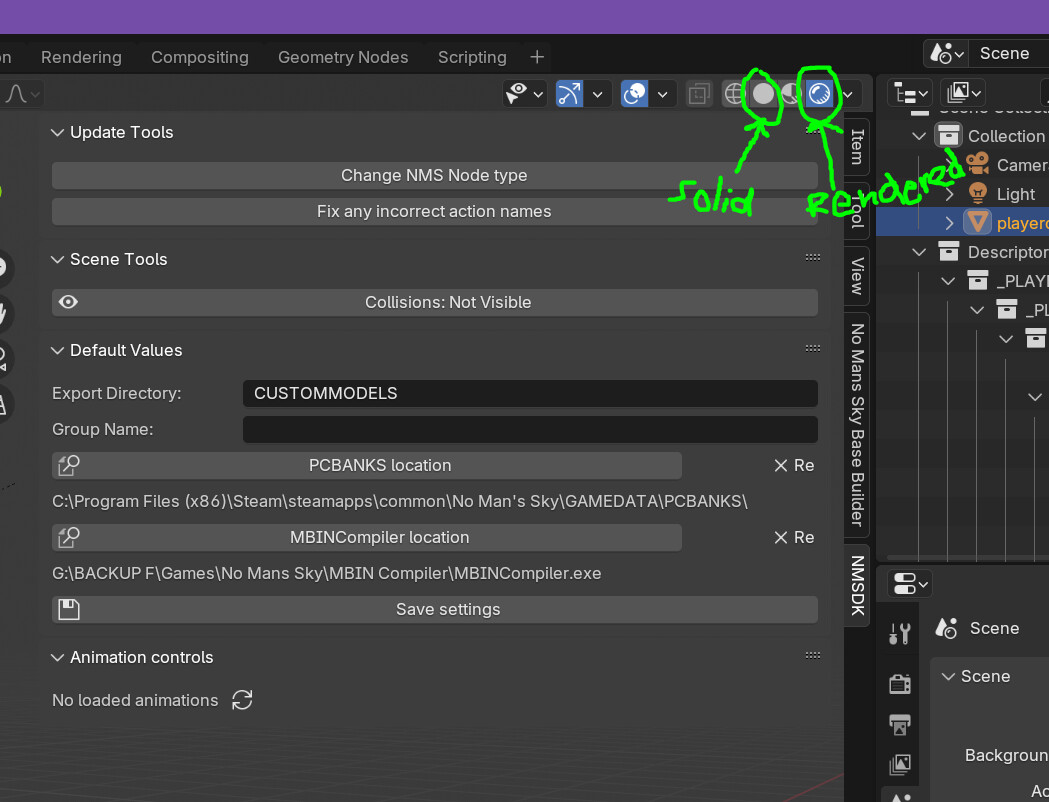
PCBANKS root should be set to your platform install PCBANKS location (in my case Steam), MBINCompiler location sounds to be correct. You can check and edit this in Blender, see image:
The import .scene files is indeed what you would need, where you browse the unpak files that were made with the HGPAKtool to open the NMS .scene file needed. In case of the player character, see image:
In my case, I have used the HGPAKtool to extract all files to a separate folder using Voyagers 6.16. The folders that are shown after, are part of the full unpak.
Well yes, it looks pretty cool to see it with the texture layers enabled, I would however not recommend it unless really needed, as it takes quite some time before it renders all that. I’d stick to ‘Viewport Shading’ > ‘Solid’, and not select ‘Rendered’
Thanks for the reminder, I only used blender for 2-3 months in 2021 when teaching myself Photogrammetry and using it to insert PS1 models into my local reality XD I’ve more or less forgotten most things about the software, I would have totally forgot to change the render pane to something a little less resource demanding.
Just want to confirm this worked a charm, thank you so much and I look forward to making something fun with these files as ref <3
The problem was me being lazy and trying to save on HDD space by not just unpacking everything
I understand all too well, as it does take quite a bit of storage room (50+GB). There are likely quite a few folders/files you can remove if you wish. Most obvious some of the folders completely unrelated to models, textures, etc. It just works a lot easier this way and allows you to work backwards, right?! With whatever you wish to get into Blender loaded, you can even check where it all comes from, making it easier to feel more confident about deletion elsewhere…
Happy to know you got it to work now, let me know if you have new/other questions.
EDIT: If on Discord, you can also find more info or ask around in the right channels. They are always very helpful and knowledgeable.
When opening a scene it seems to hang for a bit while loading everything, but then an error is encountered and all that appears is the head. Tried with playerharacter, fourthrace, polo and gek.




 now I wish I had the patience to dive in with you…